compare
GitDesktop vs GitHub Desktop
GitDesktop is a free, open-source GitHub Desktop alternative that keeps the same approachable daily loop and adds what GitHub Desktop sends to the browser: the full pull-request loop, CI runs and logs, and issues, across GitHub, GitLab, and Bitbucket (on Bitbucket, issues go through a linked Jira project), with AI that runs on your own models, or switches off entirely.
Verified against GitHub Desktop 3.6.6 (stable) on September 30, 2026. Something stale? Open an issue.
Where GitHub Desktop still wins
- Zero prerequisites. GitHub Desktop bundles
its own Git and signs in with a browser OAuth flow. GitDesktop needs
system Git, plus
ghorglabfor GitHub and GitLab features (Bitbucket skips the CLI and signs in with an API token). Sign-in is guided from inside the app, but it's still a real first-run step. - Simplicity as a feature. Fewer surfaces, fewer concepts. If a teammate is new to Git, GitHub Desktop's smaller world is a gentler place to start.
- Git LFS. GitHub Desktop handles LFS repos
with more built-in affordance; GitDesktop relies on a system
git-lfsinstall working transparently, with no dedicated UI yet. - A decade of first-party trust. It's made by GitHub, battle-tested by millions, and if your org only blesses first-party tooling, that settles it.
Feature by feature
Both clients cover the fundamentals: clone, stage by file, hunk, or line, commit, branch, stash, sync, and resolve conflicts. The table keeps to where they diverge.
| Capability | GitHub Desktop | GitDesktop |
|---|---|---|
| Where you can use it | ||
| Forges with full PR / CI / issue support | Partial — GitHub only | Yes — GitHub, GitLab & Bitbucket Cloud — Bitbucket issues via linked Jira |
| Linux | No — macOS & Windows | Yes — Windows, macOS & Linux |
| GitHub Enterprise | Yes | Yes — via gh, per-host accounts |
| Jira | No | Yes — linked Jira Cloud project per repo |
| Pull requests | ||
| Read & review a PR in-app | Partial — checks view; hands off to the browser | Yes — conversation, files, checks, approve / request changes |
| Merge a PR in-app | No | Yes — merge & squash on all three; rebase (GitHub), fast-forward (Bitbucket) |
| Edit title, labels, reviewers | No | Yes |
| Stacked PRs | No | Yes — create, extend & dissolve stacks (GitHub); MR chains detected (GitLab) |
| Local PRs with no remote at all | No | Yes — review & merge offline, promote to GitHub, GitLab, or Bitbucket later |
| CI, releases & findings | ||
| PR checks rollup | Yes | Yes — with a failing job's log peeked inline |
| Browse all workflow runs | No — PR-scoped checks only | Yes — dedicated Actions tab |
| Dispatch, cancel, re-run workflows | Partial — re-run only | Yes |
| Failed-step logs in-app | No | Yes |
| Publish releases | No | Yes — create, edit & upload assets (GitHub & GitLab) |
| Security findings in-app | No — a secret-scanning push-protection dialog; no alerts view | Yes — Dependabot alerts, advisories, code & secret scanning (GitHub); SAST, secrets & code quality (GitLab); Code Insights reports (Bitbucket) |
| Issues & discussions | ||
| Issues | No — opens github.com | Yes — GitHub & GitLab in-app; local issues too |
| GitHub Discussions | No | Yes |
| GitHub Projects | No | Yes — board, table & roadmap views with field edits |
| Your PRs & issues across repositories | No | Yes — a My work inbox: GitHub & GitLab PRs & issues account-wide, Bitbucket PRs from recent repos |
| History & safety | ||
| File history & blame | No — opens github.com | Yes — rename-following history, per-line blame |
| Interactive rebase | Partial — squash & reorder only | Yes — pick / reword / squash / fixup / edit / drop |
| Predict a merge before running it | Partial — up to date, clean, or a conflicted-file count, in the merge dialog | Yes — fast-forward / clean / conflicts, previewed in memory (Git 2.38+) |
| Recover dropped stashes | No | Yes — a git fsck scan finds and restores them |
| Force push | Partial — --force-with-lease alone; its background fetch can void the lease | Yes — --force-with-lease + --force-if-includes (Git 2.30+), behind divergence detection |
| Ask before a pull drops your commits | No | Yes — a rebase pull that would drop pushed commits stops and names them |
| Git hooks management | No — runs hooks and can bypass commit hooks; no management UI | Yes — view / edit / disable, templates, husky, pre-commit & lefthook aware |
| Linked worktrees | Yes — since 3.6 | Yes — plus worktree-aware branch switching |
| AI — or none at all | ||
| AI without a Copilot relationship | No — Copilot access required (Copilot Free qualifies) | Yes — your own keys, local Ollama, or keyless CLI agents |
| AI code review & security audit | No | Yes — dedicated review model, postable as a PR comment |
| Keep files out of AI context | No | Yes — gitignore-style AI-ignore patterns |
| Hide every AI surface | No | Yes — one setting, nothing left behind |
| Cost & code | ||
| Price | Yes — free | Yes — free |
| Open source | Yes — MIT | Yes — Apache-2.0 |
Distilled from a ~130-row working matrix, re-checked against GitHub Desktop's release notes, changelog, and source code. Rows where both clients are simply fine were left out on purpose. Also compared: GitDesktop vs Sourcetree, GitDesktop vs GitKraken, and GitDesktop vs Tower — or see all comparisons.
The part GitHub Desktop hands to the browser
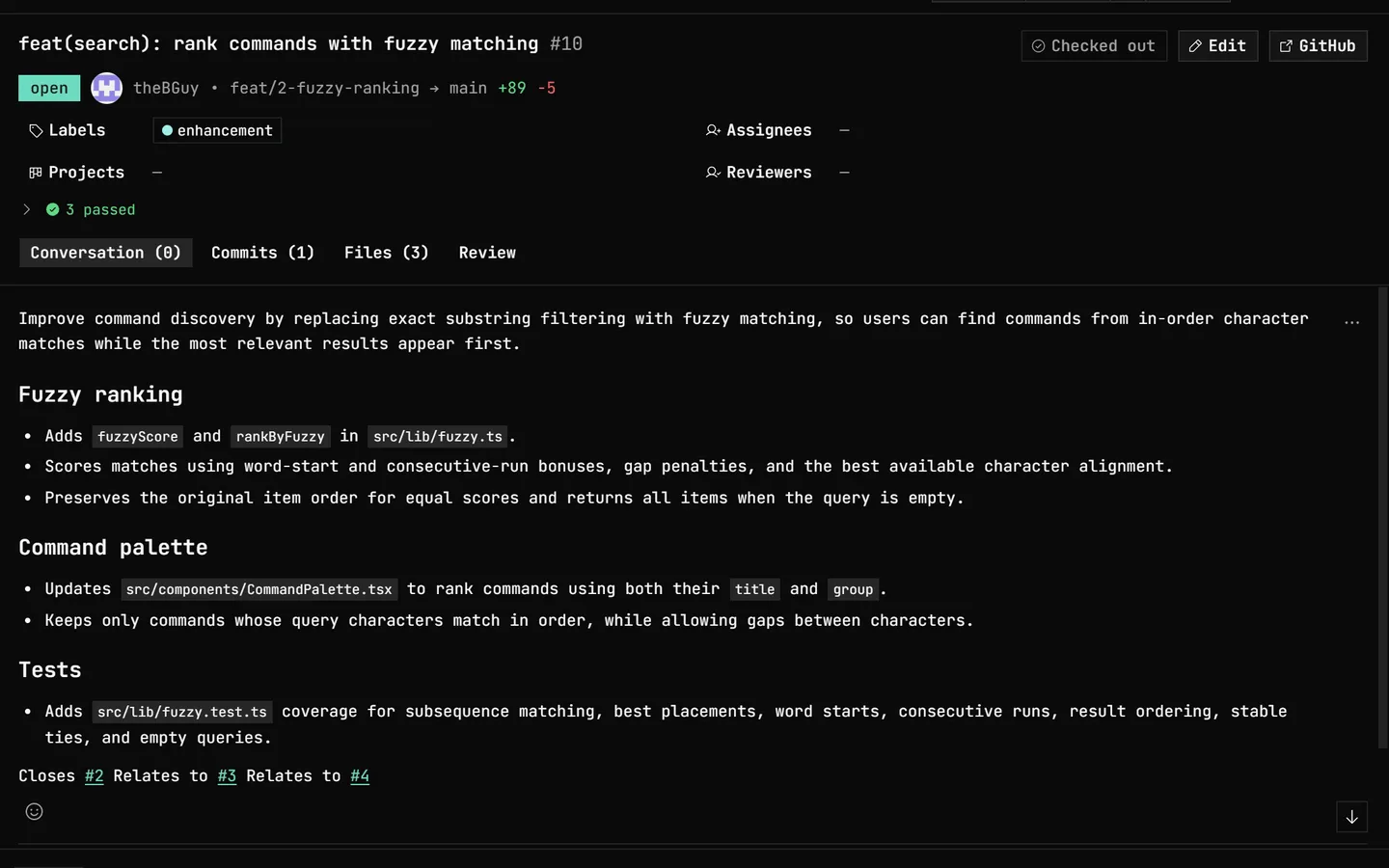
The single biggest daily difference: a pull request's conversation, changed files, CI runs and logs, review actions, and the merge itself all happen in the same window as your staging and history.
Common questions
Is GitDesktop a GitHub Desktop alternative?
Yes. GitDesktop is a free, open-source (Apache-2.0) GitHub Desktop alternative for Windows, macOS, and Linux. GitDesktop covers the same daily loop (staging, branches, history, diffs, sync) and adds the parts GitHub Desktop hands to the browser: reading, reviewing, and merging pull requests, browsing CI runs, and working issues, across GitHub, GitLab, and Bitbucket (on Bitbucket, issues go through a linked Jira project).
Does GitHub Desktop work with GitLab or Bitbucket?
No. GitHub Desktop can push and pull any git remote, but its hosted features (pull requests, checks, sign-in) are GitHub-only. GitDesktop runs the same pull-request, CI, and issue panels against GitHub, GitLab, and Bitbucket, each on its own authenticated identity (Bitbucket issues come from a linked Jira Cloud project).
Do you need GitHub Copilot for AI features?
In GitHub Desktop, yes: its commit messages and conflict resolution are Copilot-powered and require Copilot access, even when bringing your own key. In GitDesktop, no. AI runs on your own Anthropic, OpenAI, Google AI Studio, OpenRouter, or Ollama Cloud key, an OpenAI-compatible endpoint, a local Ollama model, or a keyless CLI agent such as Claude Code or Codex, and one setting hides every AI surface entirely.
What about the GitHub Copilot app?
The GitHub Copilot app is GitHub's second desktop product, built around agents. It has its own pull-request and issue views and a merge drawer, but commits and pushes come from agent sessions, with no staging you drive yourself, and it signs in with a GitHub account (Azure DevOps and Jira arrive through integrations). GitDesktop does both jobs in one window: a full manual Git client and agent delegation, on any of the three forges.
Try the whole loop.
Free and open source. Keep GitHub Desktop installed; nothing here needs an account, a migration, or a goodbye.