compare
GitDesktop vs Sourcetree
GitDesktop is a free, open-source Sourcetree alternative that runs on Linux as well as Windows and macOS, needs no vendor account, and keeps the pull-request loop (create, review, merge, CI) in the app instead of the browser, across GitHub, GitLab, and Bitbucket, with issues in-app too (via a linked Jira project on Bitbucket). AI is optional: your own models, or hidden entirely.
Verified against Sourcetree for Windows 3.4.32 and Sourcetree for Mac 4.2.19 (two separate apps on separate release lines) on September 30, 2026. Something stale? Open an issue.
Where Sourcetree still wins
- Nothing else to install. Sourcetree
bundles its own Git (system Git optional). GitDesktop needs system
Git, plus
ghorglabfor GitHub and GitLab features (Bitbucket skips the CLI and signs in with an API token). Sign-in is guided from inside the app, but it's still a real first-run step. - Mercurial. Sourcetree is the rare mainstream client still shipping Mercurial support, on both platforms, with Hg-flow to match. GitDesktop is Git-only; if your repos are hg, Sourcetree remains the tool.
- Git-flow, one menu item. Initialize a repo and the whole branch ceremony (feature, release, hotfix) is driven from the UI. GitDesktop has no git-flow support.
- Scripts bound into the UI. Custom actions put your scripts in the Actions menu and context menus, with optional keyboard shortcuts. GitDesktop's Tasks tab runs saved and inline scripts in a terminal, without menu binding.
- Git LFS tooling.
Initialize and track LFS from the menu. GitDesktop relies on system
git-lfswith no dedicated UI. - More than a decade of ubiquity. It's been a default answer to "which free Git GUI" for a long time. Teams have muscle memory and years of community answers built around it, and it's free for commercial use.
Feature by feature
Both clients cover the fundamentals: clone, stage by file, hunk, or line, commit, branch, stash, sync, and resolve conflicts. The table keeps to where they diverge. Where Sourcetree's two apps differ from each other, the row says so.
| Capability | Sourcetree | GitDesktop |
|---|---|---|
| Where you can use it | ||
| Linux | No — Windows & macOS only | Yes — Windows, macOS & Linux |
| Works without a vendor account | No — first-launch registration asks for an Atlassian or Bitbucket Server login | Yes — sign in only to the forges you use |
| Forges with full PR / CI / issue support | No — accounts add sign-in and clone lists | Yes — GitHub, GitLab & Bitbucket Cloud — Bitbucket issues via linked Jira |
| Jira | Partial — issue-key links in commit messages open the browser | Yes — linked Jira Cloud project per repo |
| Mercurial | Yes — still shipping, both platforms | No — Git only |
| Pull requests | ||
| Create a PR | Partial — opens the forge's form in your browser | Yes — in-app, with drafts; labels & linked issues on GitHub & GitLab |
| Read & review a PR in-app | No | Yes — conversation, files, checks, approve / request changes |
| Merge a PR in-app | No | Yes — merge & squash on all three; rebase (GitHub), fast-forward (Bitbucket) |
| Resolve a PR's conflicts in-app | No | Yes — non-fork PRs, in a hidden worktree; your checkout untouched |
| Local PRs with no remote at all | No | Yes — review & merge offline, promote to GitHub, GitLab, or Bitbucket later |
| Your PRs & issues across repositories | No | Yes — a My work inbox: GitHub & GitLab PRs & issues account-wide, Bitbucket PRs from recent repos |
| CI & issues | ||
| CI status in-app | Partial — Bitbucket Pipelines per-commit status — macOS only | Yes — all three forges; step logs, re-run, cancel & manual runs in-app |
| Issues | No — commit-message links open the browser | Yes — GitHub & GitLab in-app; local issues too |
| Daily Git work | ||
| Stage by file, hunk, or line | Yes | Yes — plus drag-to-stage line selection |
| Interactive rebase | Yes — squash, reword, edit, reorder, delete | Yes — pick / reword / squash / fixup / edit / drop |
| Git-flow | Yes — built in | No |
| Run your own scripts | Yes — custom actions in the Actions menu, context menus & shortcuts | Yes — a Tasks tab: saved or inline scripts, run in an interactive terminal |
| Linked worktrees | No — no worktree UI — open one as a separate repo | Yes — create, switch, rename, lock, promote & remove |
| Submodules | Yes — add from the menu, manage from the sidebar | Yes — add, remove, update, track branches, edit URLs, open as repo |
| Git LFS | Yes — initialize & track from the menu | No — system git-lfs works; no dedicated UI |
| Predict a merge before running it | No — conflicts surface after the merge runs | Yes — fast-forward / clean / conflicts, previewed in memory (Git 2.38+) |
| Ask before a pull drops your commits | No | Yes — a rebase pull that would drop pushed commits stops and names them |
| Recover dropped stashes | No — command line only; requested in-app (Windows tracker) since 2016 | Yes — a git fsck scan finds and restores them |
| AI — take it or leave it | ||
| AI assistance | No — none shipped; requests open since 2023 | Yes — commit messages, PR descriptions, review, delegated tasks — your own models |
| Works with AI fully out of the way | Yes — there is none | Yes — one setting hides every AI surface |
| Cost & code | ||
| Price | Yes — free, commercial use included | Yes — free |
| Open source | No — proprietary EULA | Yes — Apache-2.0 |
Every Sourcetree cell traces to a primary Atlassian source (release notes, support documentation, or its public issue tracker), checked on the date above. Rows where both clients are simply fine were left out on purpose. Also compared: GitDesktop vs GitHub Desktop, GitDesktop vs GitKraken, and GitDesktop vs Tower — or see all comparisons.
The part Sourcetree hands to the browser
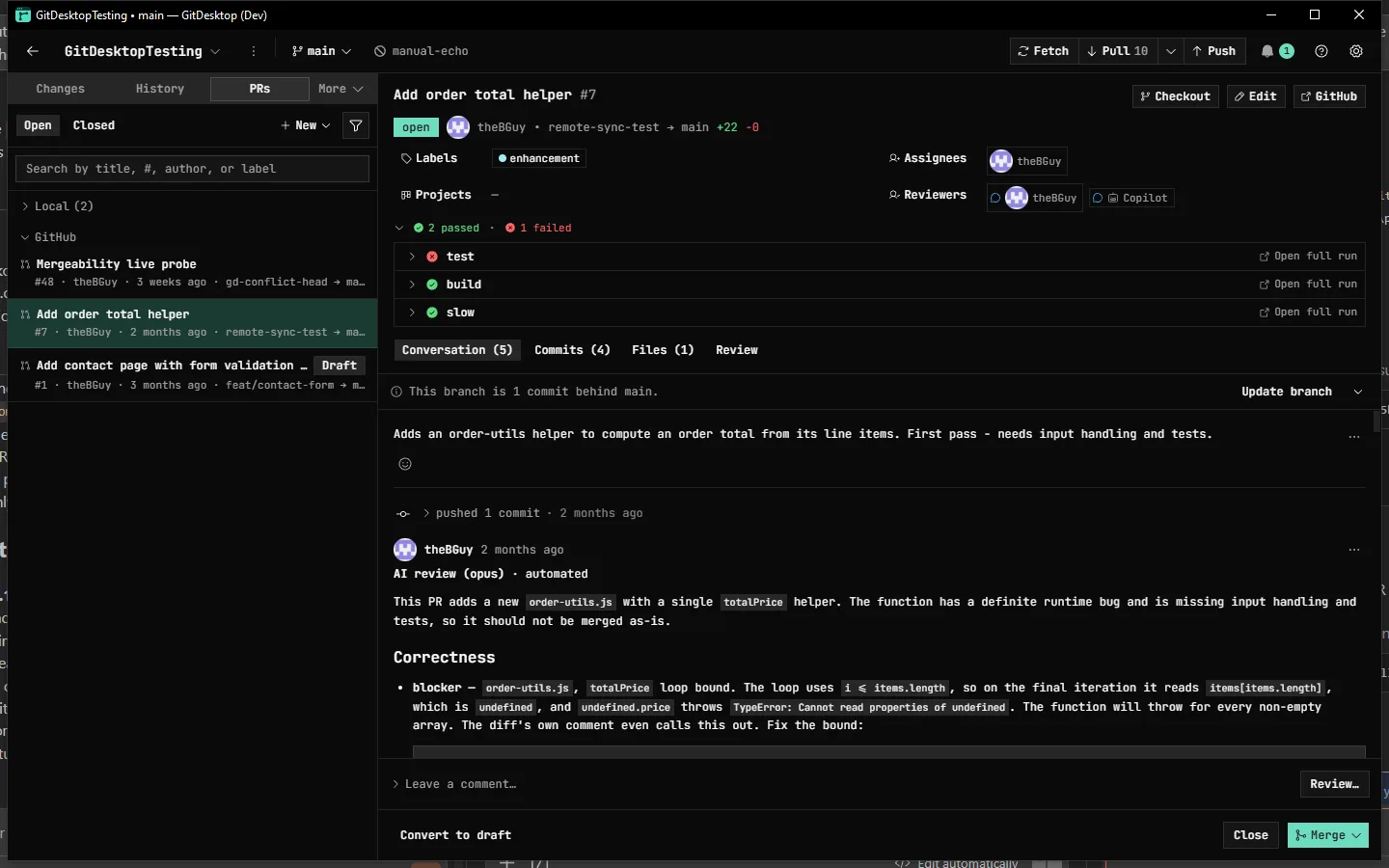
Sourcetree's "Create Pull Request" opens a browser tab, and reading, reviewing, or merging one was never added. Atlassian's own answer has stood since 2018: "we don't currently support listing or viewing PRs in Sourcetree." In GitDesktop the whole loop lives next to your staging and history.
Common questions
Is GitDesktop a good Sourcetree alternative?
For Git work, yes. GitDesktop covers the fundamentals Sourcetree is loved for (staging by file, hunk, or line, interactive rebase, stashes, submodules) and adds what Sourcetree hands to the browser: creating, reviewing, and merging pull requests, CI runs and their step logs, and issues, across GitHub, GitLab, and Bitbucket. On Bitbucket, issues go through a linked Jira project. It's free, open source (Apache-2.0), and needs no vendor account. If you rely on Mercurial or git-flow, Sourcetree keeps those, and the table above says so.
Is there a Sourcetree for Linux?
No. Atlassian ships Sourcetree for Windows and macOS only, and its staff said in July 2026 that there are no plans to add Linux support. GitDesktop ships Windows, macOS, and Linux builds, including an AppImage and a Homebrew cask.
Do you need an Atlassian account to use Sourcetree?
Usually. Atlassian's install documentation says you need an Atlassian account to use Sourcetree, and the app asks you to register at first launch; a company Bitbucket Server login can register it instead. GitDesktop has no vendor account at all: you sign in only to the forges you actually use (GitHub via gh, GitLab via glab, Bitbucket with an API token), and none of it is needed for local-only work.
Is Sourcetree still maintained?
Yes, in a steady-patch sense: both apps shipped point releases through summer 2026 (Windows 3.4.32 in August, Mac 4.2.19 in July). But the two platforms run on separate codebases with a long-standing feature gap between them, community threads note it's absent from Atlassian's public product roadmap, and the big asks (worktree support requested since 2015, in-app pull requests since 2017) remain open.
Try the whole loop.
Free, open source, and no account to create. Keep Sourcetree right where it is. Open one repo in GitDesktop and see which window you keep.